
Death Incoming!
Lion StudiosAdventure
4.58.34K Reviews
- Version
- 2.1.29
- Installs
- 50.00M
- Age Rating
- Teen
Screenshots
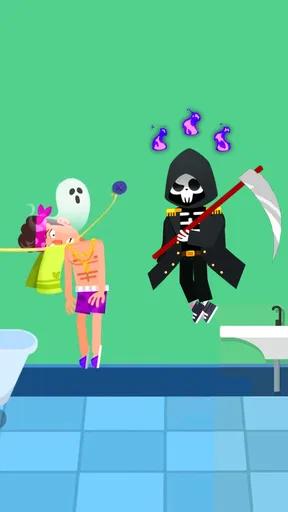



Our Review of Death Incoming!
 Analysis by Appyee
I went into Death Incoming! expecting a quick mobile distraction, and that is exactly where it works best. This is an adventure game from Lion Studios built around short, visual puzzles in which you look at a scene, notice what is out of place, and work out how your action changes the outcome. Its store summary asks whether you are deadly smart, but the real appeal is less about speed and more about paying attention to small details.
The game is free to download, carries a Teen content rating, and is designed for casual sessions rather than long uninterrupted campaigns. It has reached over 50 million installs and holds a 4.5 average from around 161 thousand ratings, so it is clearly aimed at a broad mobile audience. I can understand that reach: the controls are simple, the scenes are easy to read, and each puzzle usually gives you a compact problem instead of asking you to learn a complicated control scheme.
That simplicity can be misleading, though. The first few scenes feel obvious, while later moments depend on interpreting the environment rather than tapping everything randomly. I found the best way to enjoy it was to treat each screen like a tiny visual riddle. Look first, test one idea, and only then try something else. If you prefer action-heavy adventures, deep stories, or precise platforming, this probably will not replace your main game. If you like quick puzzle challenges with a mischievous edge, it is much easier to recommend.
What to expect when you begin
The opening experience is deliberately approachable. You are not dropped into a large map with a list of systems to memorize. Instead, the game presents a scene and expects you to identify the meaningful object, person, or interaction. That makes the first successful action feel immediate: you see a possible cause, tap it, and watch the scene respond.
My advice for a first-time player is not to rush through the opening screens. The early puzzles teach the game’s visual language. Some objects are there mainly to make the setting feel busy, while another detail is the actual key to the solution. Learning that difference is more important than memorizing any particular answer.
The tone also matters. The title and premise point toward cartoonish danger, and the Teen rating is worth taking seriously if you are choosing the game for a younger player. It is not the sort of gentle matching puzzle I would automatically hand to a child. The presentation is stylized rather than realistic, but the situations revolve around death and accidents, which may not suit everyone.
Sessions work well in ordinary gaps during the day. I could imagine playing a few scenes while waiting for an appointment, taking a short break from work, or relaxing before bed. The game does not demand that you remember a complicated plot between sessions, so it is easy to put down and return to. That same structure means it may feel thin if you want a strong narrative reason to keep going.
Installing it without overthinking the first launch
On Android, the listed minimum operating system is Android 7.1, which makes the game accessible to many older devices still in everyday use. The current version is 2.1.29. I would still make sure the phone has a comfortable amount of free space and that the system is behaving normally before starting, not because the game is unusually demanding, but because puzzle games are frustrating when taps lag or the display is cramped.
There is no purchase required to start because the game is free. It does include in-app purchases priced at $2.99 per item. For a first session, I would ignore the store completely and see how the basic puzzle flow feels. That gives you a clearer idea of whether you enjoy the central activity instead of judging the game through optional extras.
The first launch should be treated as a short orientation rather than a test of intelligence. Pay attention to what the game highlights, but do not assume every highlighted object is the final answer. A useful habit is to scan the scene in three passes: background, characters, then movable or tappable details. This prevents the common mistake of focusing only on the most obvious object in the middle of the screen.
I also recommend playing with the phone held steadily. Many solutions depend on tapping a small area, and a hurried thumb can select the wrong thing. If a scene seems unresponsive, try tapping the object’s center rather than its outline. That sounds basic, but on a busy illustration the interactive area may be visually smaller than the surrounding decoration.
How to reach the first meaningful success
The first real breakthrough comes when you stop asking, “What should I tap?” and start asking, “What change would make this situation happen?” That shift is the foundation of the game. You are not simply finding hidden buttons; you are reading a chain of cause and effect presented through a still scene.
For example, when a character appears to be in danger, look for the object that controls the situation rather than tapping the character repeatedly. A nearby item, environmental detail, or another person may be the relevant trigger. I found that pausing for a few seconds before touching the screen often produced a better result than immediately trying every visible element.
When you think you have found the answer, make one deliberate tap and watch the complete reaction. Do not rapidly tap again if the first action seems to do nothing. Some scenes communicate their result through a small movement or change in position, and repeated tapping can make it harder to understand what actually caused the outcome.
The most useful beginner technique is to test one hypothesis at a time. If you touch five objects in quick succession, you may eventually succeed, but you will not learn the visual logic the game expects. If you isolate each attempt, a failed action becomes useful information. You learn which objects are decorative, which are interactive, and which combinations are worth considering.
There is also a practical reason to avoid random tapping: the game’s enjoyment comes from the reveal. When the scene changes because you noticed the right detail, the success feels earned. When the answer arrives after a frantic sweep across the screen, the game becomes a guessing exercise. That distinction becomes more important as the puzzles stop advertising their solutions so clearly.
Where first-time players commonly get confused
The biggest source of confusion is the difference between a logical clue and a visual distraction. The scenes contain enough activity to make you look in several directions, but not every unusual object has a purpose. I initially spent too much time treating anything colorful or centrally placed as important. In practice, the quieter detail at the edge of the scene can be the one that matters.
Another issue is assuming that every puzzle uses the same kind of interaction. A player may expect to tap the person in danger, then become stuck when the solution is connected to the surroundings. Try thinking in terms of relationships: what is the character near, what could move, and what could cause a consequence? That approach is more reliable than searching for a single glowing target.
Some players may also wonder whether they are playing incorrectly when a scene does not resolve immediately. I would not interpret a failed attempt as a sign that the game requires perfect timing. In my experience, the more useful response is to inspect the whole composition again. Move your eyes away from the first clue and consider objects that seemed irrelevant on the first pass.
Hints can be tempting if they are available in the moment, but I would save them for a puzzle where you have already formed a few reasonable theories. Using help too early turns the game into a sequence of instructions, while waiting gives you a chance to understand the pattern. If you are playing during a short break and only want to progress, however, using assistance is a reasonable trade-off rather than a failure.
It is also worth remembering that the game is not a conventional adventure with exploration in the usual sense. You are not wandering through a large world, collecting equipment, or building a character. The adventure label describes the situations and problem solving more than a traditional journey. Players looking for an expansive map should choose a different type of adventure game; players who enjoy self-contained visual scenarios will find the format more comfortable.
Using the game in an everyday routine
A realistic way to play is to use it as a reset between demanding tasks. Suppose I have ten minutes before a meeting. I can open the game, attempt a couple of scenes, and stop without losing the thread of a long story. The short format gives me a clear endpoint, and the visual puzzles require enough attention to pull me away from endless scrolling.
That routine works best when I want light mental activity, not when I need complete silence or intense concentration. The game is casual, but solving a puzzle still requires noticing details. If I am distracted, I am more likely to mistake a failed observation for a difficult puzzle. In that situation, closing it and returning later is better than repeatedly tapping in frustration.
It can also work as a shared game. Handing the phone to another person and asking what they notice creates a simple conversation, especially because two people may focus on different parts of the same scene. I would not present it as a cooperative adventure with a formal multiplayer system; the value here is informal, like solving a visual riddle together.
For younger teenagers, the Teen rating should guide the decision. The cartoon style may make the game look harmless at first glance, but its subject matter is still built around dangerous outcomes. Adults who dislike dark humor or death-themed puzzles may also want to skip it, even if they usually enjoy casual adventures.
What changes as you continue
Once the basic interaction becomes familiar, the main challenge is resisting the urge to apply the same solution pattern everywhere. Early success can make you overconfident. You may begin tapping the most obvious object automatically, only to discover that the scene is asking you to consider a different relationship between its elements.
I found it helpful to keep a mental distinction between observation and prediction. First describe what is visible without deciding what it means. Then predict which action could produce the intended result. This two-step approach sounds slower, but it usually saves time because it prevents a first impression from controlling the entire attempt.
A second useful habit is to revisit the scene after a failed tap with a different focus. Instead of staring at the character, inspect the edges, the objects behind them, and anything that could plausibly change position. This is one of the game’s less obvious strengths: it trains attention to context, not just recognition of a highlighted answer.
The trade-off is that the experience can become repetitive if you do not enjoy this kind of observation. There is no reason to force yourself through it simply because the game is popular. Its audience of over 161 thousand ratings and more than 50 million installs shows strong interest, but popularity does not change the core fact that the format is narrow. You are repeatedly reading a scene and choosing an action; if that loop does not satisfy you, a story-driven adventure or a traditional logic game may be a better fit.
The version number, 2.1.29, indicates that the game is an established release rather than a brand-new experiment. That is reassuring for someone who prefers a familiar, already-developed mobile title. Still, I would judge it on the immediate puzzle loop rather than expecting a radically different experience after installation. The core appeal is present from the beginning.
When the free model feels reasonable
Because the game costs nothing to begin, it is easy to try without making a commitment. My recommendation is to play enough of the opening section to decide whether solving the scenes is genuinely fun before considering any optional purchase. The listed in-app purchases are $2.99 per item, so the important question is not whether the entry price is low, but whether the extra convenience would improve your personal rhythm.
If you enjoy working out answers independently, you may prefer not to spend anything. The satisfaction comes from noticing the clue, and paying to bypass a challenge can remove the part that makes the game worthwhile. On the other hand, someone using the app for brief relaxation may value a shortcut when a particular scene becomes irritating. That is a personal trade-off, not something every player needs.
I would be cautious about treating purchases as a solution to a broader problem. If the game feels repetitive, an extra item will not transform it into a different genre. If you like the basic scenes but occasionally need help, optional spending may make more sense. The best approach is to decide based on how often you actually get stuck, rather than buying immediately because a puzzle resists your first idea.
Who should choose it, and who should skip it
I would recommend this adventure game to people who enjoy visual puzzles, short sessions, and a slightly dark sense of humor. It is particularly suitable for someone who wants a game that can be understood quickly but still rewards careful looking. It also suits players who prefer tapping and observation over virtual controls, combat systems, or lengthy tutorials.
I would skip it if you need a substantial story, character development, or a large world to explore. It is also a poor match for anyone looking for a calm, family-friendly puzzle experience because the Teen rating reflects the death-centered premise. Players who dislike trial and error may become annoyed when a scene’s intended interaction is not immediately clear.
Compared with a word puzzle, this game gives you more visual context and less dependence on vocabulary. Compared with a hidden-object game, it asks you to understand consequences rather than merely locate items. Compared with a larger adventure title, it removes exploration and replaces it with compact scenes. That makes it easier to start and stop, but it also limits the sense of progression that a full adventure can provide.
My next-step advice after the first few scenes
After you have completed the opening puzzles, do not change your approach by tapping faster. Change it by observing more deliberately. Before each attempt, identify the likely danger, list the nearby elements that could influence it, and choose the action that best connects those two points. This gives you a repeatable method without turning the game into a rigid checklist.
If you are stuck, take a short break instead of staring at the same arrangement. Returning with fresh eyes is surprisingly effective in a visual puzzle because your first interpretation can become an invisible assumption. When you come back, start with the least obvious part of the scene. That small reset often reveals why the earlier attempts felt unproductive.
My final view is that Death Incoming! is best understood as a collection of quick, darkly comic observation challenges. Lion Studios keeps the entry point simple, and the free model makes trying it easy, but the game earns its place on a phone only if you enjoy discovering cause and effect in illustrated scenes. I like it for short breaks and for passing a puzzle back and forth with a friend, while I would choose another adventure for a deeper story or broader exploration.
If you approach it patiently, the path from installation to the first meaningful success is reassuring: observe the whole scene, test one idea, learn from the result, and continue. That method is more rewarding than random tapping and remains useful as the puzzles become less obvious. For the right player, it is a compact way to exercise attention; for everyone else, the Teen tone and limited format are clear reasons to look elsewhere.
Verdict
Strengths of Death Incoming!
- Simple tap controls make it easy to play casually.
- Dark humor gives the puzzle scenes a distinctive personality.
- Short levels are convenient for quick gaming sessions.
- Hidden interactions encourage you to inspect each scene carefully.
- The cartoon visuals run smoothly on many mobile devices.
Limitations of Death Incoming!
- Some solutions feel trial-and-error rather than logically explained.
- Frequent advertisements can interrupt the flow between levels.
- The gameplay becomes repetitive after discovering the main mechanics.
- Certain scenes rely on exaggerated humor that may not suit everyone.
- Later puzzles offer limited challenge for experienced players.
Other Releases by Lion Studios
View All
The Real Juggle: Soccer 2026
Sports3.0

The Superhero League 2
Puzzle4.6

Popsicle Stack
Arcade4.4

Hooked Inc: Fishing Games
Simulation4.6
Similar Picks in This Category
View All
Roblox
Roblox Corporation4.2

Pokémon GO
Niantic, Inc.3.5

Ninja warrior: legend of adven
TOH Games4.6

Ninja Arashi
Black Panther4.6

Eyes - The Horror Game
Fearless Games sp. j.4.5

Critical Action:Gun Strike Ops
FPS Shooter & Action Game4.3
Frequently Asked Questions
What is Death Incoming! about?
Death Incoming! is a casual puzzle game built around humorous, cartoon-style death scenarios. You take the role of a reaper who must observe each scene, identify the right objects or actions, and trigger a chain of events that leads to a character’s demise. The gameplay is mostly based on experimentation, timing, and finding unexpected solutions rather than fast reflexes or complex controls.
Is Death Incoming! free to download and play?
The game can generally be downloaded for free, but the free version may include advertisements and optional in-app purchases. Ads can appear between stages or during other parts of the experience, while purchases may offer ways to remove advertising or unlock additional content. Before downloading, it is worth checking the current store listing because pricing, available items, and monetization options can change between Android and iOS.
Does Death Incoming! require an internet connection?
Many of the game’s puzzle levels can usually be played without a continuous internet connection, which makes it suitable for short sessions while traveling or when mobile data is unavailable. However, an internet connection may still be needed for advertisements, purchases, updates, analytics, or newly added content. Availability of offline play can also vary after updates, so users should test it on their specific device.
Is Death Incoming! appropriate for children?
Although Death Incoming! uses colorful graphics and exaggerated cartoon humor, its central theme involves characters dying in comic and sometimes dark situations. It is not presented as realistic violence, but younger children may still find the subject matter uncomfortable or may not understand the game’s style of humor. Parents should review the age rating, advertising, in-app purchase settings, and the game’s content before allowing children to play.
What devices are compatible with Death Incoming!?
Death Incoming! is available for supported Android and iOS devices, but the exact requirements depend on the version currently offered in each official app store. Most recent phones and tablets should handle the game smoothly because its visuals are relatively lightweight. Older devices may experience slower loading, reduced performance, or compatibility issues. Checking the store page for the required operating-system version and available storage is recommended before installation.
Play our best games!


